Remote Start3
Minutes before leaving, you can start your connected vehicle’s engine from your Ford App in order to heat or cool the cabin to the last known temperature setting.




Team Hutchinson Ford

Every new Ford is fitted with an embedded modem. When activated, you can connect with your vehicle remotely via the Ford App.1 This means that you can locate your vehicle2, lock and unlock the doors, start the engine, and much more – all through your smartphone or smartwatch.
Set up Ford App in 3 simple steps
Visit the App Store or Google Play Store to download the latest App version.
Now also available on Apple and Android smartwatches.
Open the Ford App to create an account, or sign in to your existing account.
Enter or scan the vehicle’s VIN number using the Ford App and accept in-vehicle prompts to connect the vehicle and complete the set-up process.
When you fully activate your vehicle, you can access connected vehicle features such as:
Minutes before leaving, you can start your connected vehicle’s engine from your Ford App in order to heat or cool the cabin to the last known temperature setting.
Conveniently use your Ford App to make sure your doors are locked or unlocked without being anywhere near your vehicle.

Check key variables such as fuel or EV battery level and odometer on the Ford App to help plan your journey.

The Ford App capability extends to Vehicle Health Alerts, which can be sent directly to your mobile device, pre-empting service needs and general maintenance such as low washer fluid.

Check your vehicle’s exact location in the Ford App, which is particularly useful if you share your vehicle with members of your household or if you have forgotten where you parked it.

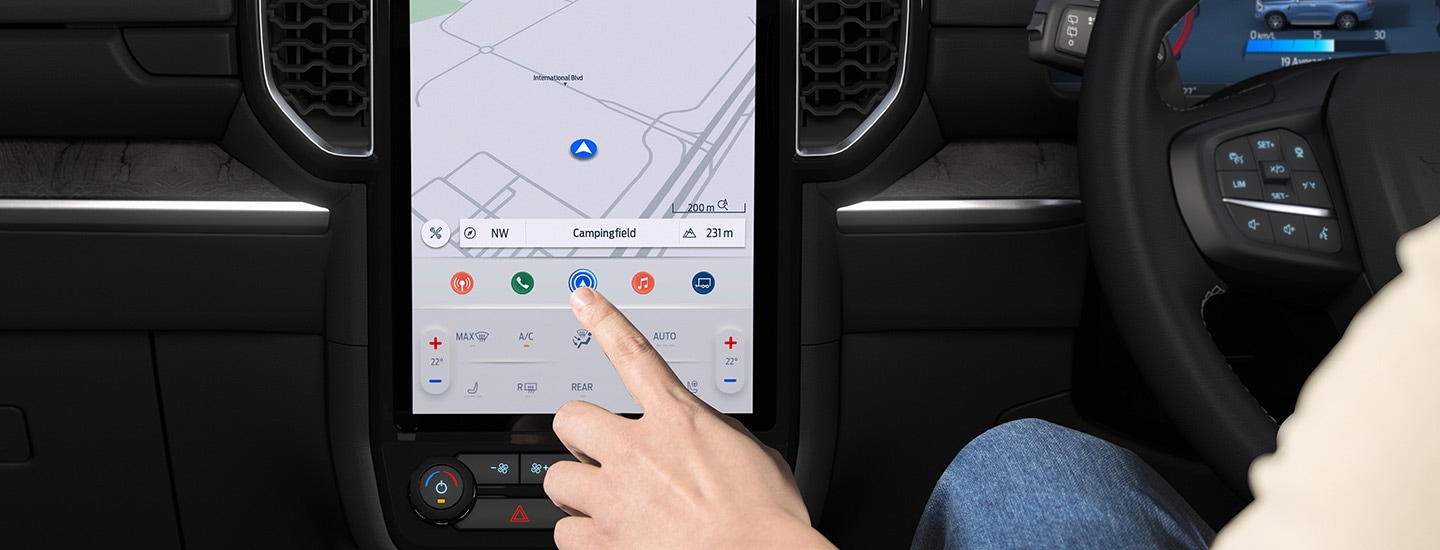
Connected Built-In Navigation enhances your embedded satellite navigation, with benefits such as updated maps and live traffic updates that provide the fastest routes with alerts and re-routes based on incidents like accidents and congestion. You can also get the latest weather reports along the way.
Updated map data is also used by certain Driver Assist features such as Traffic Sign Recognition, Intelligent Adaptive Cruise Control, and Intelligent Speed Assist.
Connected Built-In Navigation is offered for a 1-year trial from the warranty start date, after which it is subject to a subscription fee. Without Connected Built-In Navigation, you will still have access to embedded navigation. However, additional functionality such as live traffic and updated map data will be discontinued. If you use the Driver Assist features mentioned above, we recommend that you keep map data updated via Connected Built-In Navigation.
Already a Ford owner? Manage your Connected Services through your Ford Account.


[1] Use of Ford App is subject to the Ford App Terms and Privacy Policy available on ford.co.nz/fordapp and requires a compatible mobile device, internet access and software (including software updates from time to time). Ford App functionality and appearance may change over time due to software updates. You are responsible for internet access, mobile network data and voice call services required for your use of the Ford App on your mobile device, including associated fees. The Ford App and Ford App Connect modem can only work when both are connected to the telecommunications network. The Ford App Connect modem will only function on the 3G, 4G or 5G telecommunications networks. When these networks are no longer available, the modem will stop functioning and the connected services and all data transmission via the modem will cease. Ford cannot guarantee that Ford App will be in fully operating condition at all times and the Ford App may be unavailable or particular Ford App services interrupted. Ford is not responsible for any limitations or restrictions of the telecommunications network or of your mobile device. Warning: Local laws prohibit some phone functions while driving. Check your local road rules before using these functions. Use Remote Vehicle Start and Stop responsibly and only in well ventilated areas where you are aware of your vehicle’s surroundings.
[2] Vehicle Location settings must be switched on.
[3] Remote Start & Stop only available on automatic vehicles. Use responsibly and only in well ventilated areas where you are aware of your vehicle’s surroundings.
[4] Zone Lighting is standard on Ranger Wildtrak and Raptor, and Everest Trend, Sport, Wildtrak and Platinum only. Zone Lighting will not operate if battery charge is insufficient. The length of time that Zone Lighting will operate depends on the battery charge, the types of lights fitted to the vehicle (LED or Bulb) and other electrical loads connected to the vehicle. The system will automatically turn off after a period of time to preserve the battery's engine starting performance.
[5] Trailer Light Check is standard on Ranger. Trailer Light Check has been designed to operate with a Factory Fit Tow Bar or Genuine Ford Accessory tow bar and can be used via SYNC, or via the Ford App. as a Connected Service. Where used via the app as a Connected Service, eligible vehicles receive 1 year of service from the Ford Express New Vehicle Warranty start date after which time, the Connected Service may cease to be available, or may be subject to a subscription fee. Users must have created a Ford App account (terms apply) and have fully activated the vehicle’s Ford App Connect modem to use this feature via the app.
[6] Connected Built-In Satellite Navigation is a Connected Service where eligible vehicles (Standard on all Everest variants, Ranger XLT, Sport, Wildtrak and Raptor. Not available on Ranger XL) receive 1 year of service from the Ford Express New Vehicle Warranty start date. after which it is subject to a subscription fee. Without Connected Built-In Navigation, you will still have access to embedded navigation. However, additional functionality such as live traffic and updated map data will be discontinued. If you use the Driver Assist features mentioned above, we recommend that you keep map data updated via Connected Built-In Navigation. Users must have created a Ford App account (terms apply), have fully activated the vehicle’s Ford App Connect modem and have SYNC Location set to ‘on’ to use this feature.


